
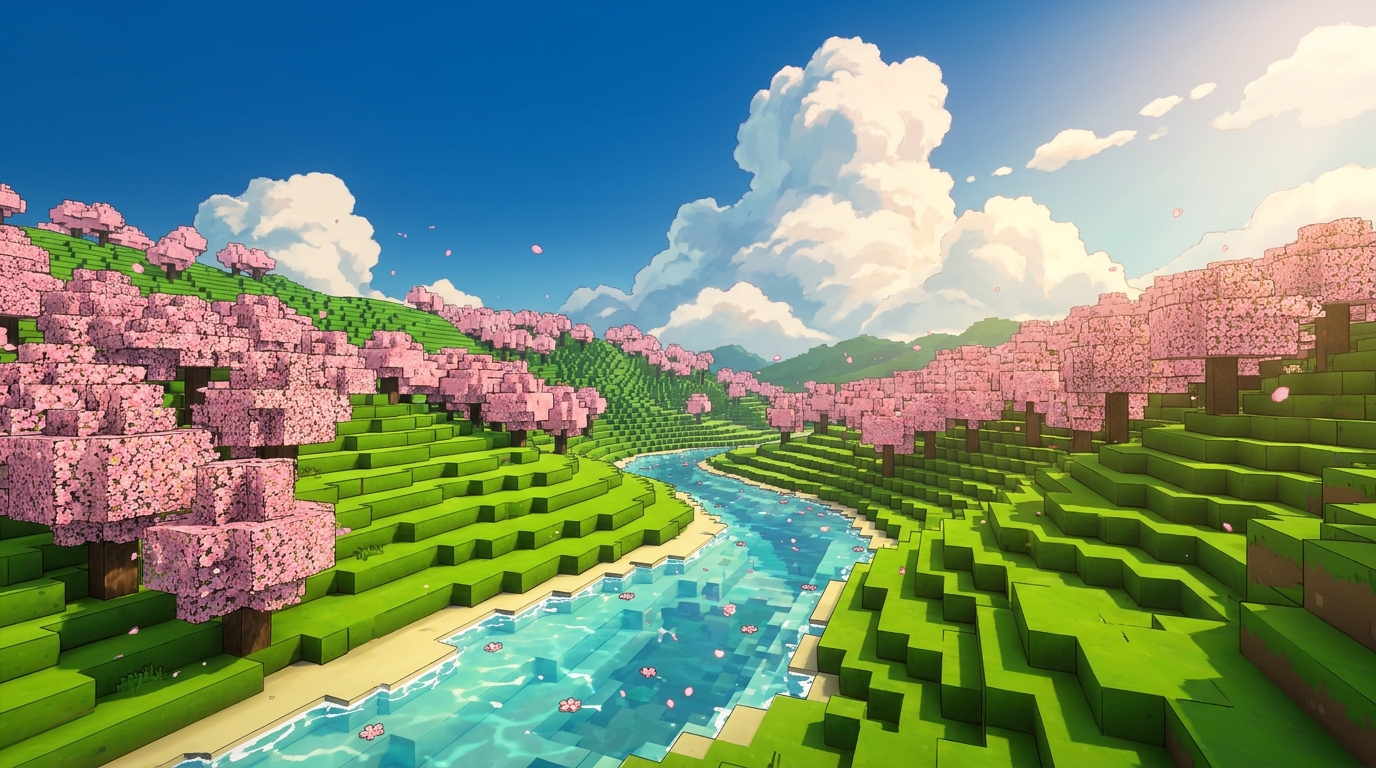
Minecraft's default voxel aesthetic has charmed hundreds of millions of players worldwide for over a decade. Yet, as modern graphics capabilities advance, many players seek visual overhauls that transcend generic hyper-realistic shader packs. Realistic water and ray-traced shadows are impressive, but they often clash with Minecraft's iconic blocky identity and severely punish your frame rate.
Enter the world of cel-shaded anime shaders. By wrapping Minecraft in vibrant pastel hues, hand-drawn ink contours, and cinematic volumetric lighting, you can transform your everyday survival world into an enchanting Studio Ghibli or Makoto Shinkai animated film.
In this comprehensive guide, we explore how to install, configure, and optimize the celebrated Cartoon Dreams Shader for peak visual fidelity and buttery-smooth FPS.
1. What Makes Cartoon Shaders Different?
Traditional shaders (such as BSL, SEUS, or Complementary) attempt to mimic real-world physics: realistic PBR textures, atmospheric haze, and physically based rendering.
In contrast, cel-shading (toon shading) uses non-photorealistic rendering (NPR) algorithms:
-
Edge Detection & Outlining (Sobel Filters): The shader scans normal vectors and depth buffers to draw delicate, customizable black or colored ink borders around blocks, mobs, and items.
-
Quantized Shading Bands: Instead of smooth light gradients, light falls across blocks in discrete, stylized color steps, giving every surface the look of hand-painted animation cels.
-
Vibrant Atmospheric Scattering: Sunsets and sunrises burst with warm apricot and magenta tones, while nights retain clear, fairy-tale visibility rather than blinding pitch-black darkness.
2. Choosing Your Shader Loader: Iris vs. OptiFine in 2026
To run shaders in modern Minecraft (1.20 to 1.21+), you need a shader-compatible client mod:
Iris Shaders + Sodium (Recommended)
Iris is the modern gold standard for Fabric and NeoForge. By leveraging Sodium's revolutionary rendering engine, Iris runs shaders with up to 2x to 3x higher FPS compared to legacy loaders.
-
Near-instant shader pack switching (no freezing screen).
-
Full compatibility with modern performance mods (Lithium, FerriteCore, Indium).
OptiFine
The legendary original shader loader. While still widely supported on standalone Forge setups, it lacks the multi-threaded chunk rendering optimizations that Sodium and Iris provide.
3. Step-by-Step Installation of Cartoon Dreams Shader
Installing Cartoon Dreams Shader takes less than two minutes:
-
Download the Shader Pack: Head to the Cartoon Dreams Shader page on Devlio and download the verified
.ziparchive. -
Open Your Shaderpacks Directory:
-
Launch Minecraft with Iris or OptiFine installed.
-
Navigate to Options -> Video Settings -> Shader Packs.
-
Click the Open Shader Pack Folder button.
-
Move the Zip File: Drag and drop
Cartoon Dreams Shader.zipinto the folder (do not unzip the archive). -
Apply and Enjoy: Select Cartoon Dreams from your in-game list and click Apply.
4. Fine-Tuning Settings for Maximum Beauty & 100+ FPS
Cartoon Dreams Shader includes an extensive in-game configuration menu. Here are the recommended profiles:
The "Studio Ghibli" Cinema Profile (High-End GPUs)
Outline Width: 1.5px (Sharp Ink)
Shadow Map Resolution: 2048x2048
Volumetric God Rays: Cinematic High
Waving Foliage & Leaves: Enabled
Water Reflections: Stylized Refraction
Color Saturation: +15%
The "Potato & Budget Laptop" Performance Profile (60-144 FPS)
Even on integrated graphics or budget laptops, you can achieve rock-solid framerates:
Shadow Map Resolution: 1024x1024 (or Disabled)
Outline Width: 1.0px
Volumetric Clouds: Fast 2D Toon
Waving Grass: Low
Render Scale: 1.0x (Native)
5. Pairing Cartoon Shaders with Anime Resource Packs
To complete the anime aesthetic, pair Cartoon Dreams with complementary texture packs:
-
Bare Bones: Strips away noisy default textures to match the clean trailer style of official Minecraft animations.
-
Mizuno's 16 Craft: Adds charming cottagecore textures and cozy anime fantasy decorations.
-
Fresh Animations: Replaces rigid mob walk cycles with fluid, expressive character animations.
Conclusion: Rediscover Minecraft Through a New Lens
If you've grown tired of monotonous vanilla survival or hyper-realistic shaders that melt your graphics card, switching to an anime cartoon shader breathes entirely fresh wonder into every sunset, village, and mountain peak.
Download Cartoon Dreams Shader on Devlio and experience your Minecraft worlds like never before.
Discussion & Comments (0)
Leave a Comment
No comments yet. Be the first to share your thoughts!